
Baby monitor app.
Hear the cry. See the face. Soothe from the hallway.
A spare iPhone, iPad, Android phone or Mac becomes the nursery camera in about 3 minutes. It alerts your phone when your baby cries, or when the camera can no longer see your baby’s nose and mouth. With RECAM Pro, it also plays a lullaby or white noise in the room.
Live video and alerts free for your first 3 days, then RECAM Pro.
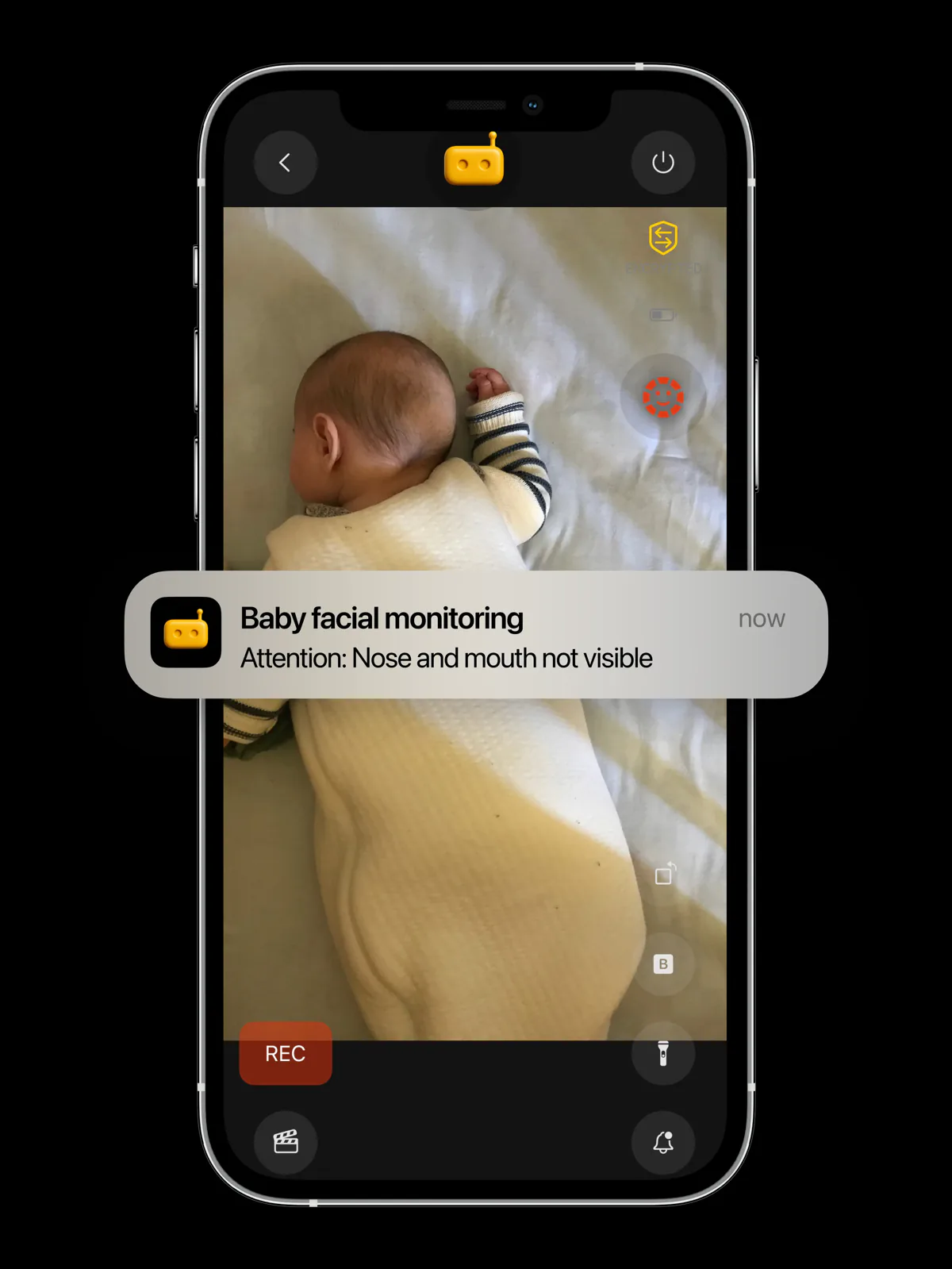
Baby face monitoring
Nose and mouth in view.
Or an alert on your phone.
In Baby Phone mode, the camera device looks for your baby’s face several times a second. It alerts you when the camera can no longer see your baby’s nose and mouth, and again when the face is clear. Every check happens on the device in the nursery.
It can’t tell why: a turned head, a baby out of frame or too little light all look the same to it. The alert means one thing: go and look.
- “Attention: Nose and mouth not visible”When the camera sees neither the nose nor the mouth.
- “Face clear (nose and mouth tracked)”When it finds the nose or the mouth again.
- Your choice, from the face buttonMonitoring with alerts, Monitoring without alerts or Monitoring off.
RECAM is not a medical or certified safety device. It complements but does not replace direct supervision.
- Nose and mouth not visible
- Monitoring
- Monitoring off
Cry alerts
Hear the cry, even from the garden.
Baby Phone mode listens for six sounds and alerts everyone watching. You can switch on others in settings, from more than 40 sound patterns.
- Baby crying
- Crying, sobbing
- Screaming
- Baby laughter
- Giggling
- Laughter
On the device
The listening happens on the camera device. No sound is uploaded to be analysed.
Through the lullaby
Sound detection keeps running while a lullaby or white noise plays.
Light stays off
In Baby Phone mode, the torch stays off when the camera is a phone.
Lullaby & white noise Pro
Start the lullaby from the sofa.
It plays in the nursery.
On the live view, tap Ambience and pick Lullaby or White noise. The camera device plays it from its own speaker, on repeat, until someone turns it off. Everyone watching gets a notification when it starts or stops.
- From the camera device’s own speaker.
- On repeat, until someone turns it off.
- Cry alerts keep listening.
Part of RECAM Pro, on a camera in Baby Phone mode. Two tracks, one lullaby and one white noise, played a little below the camera device’s volume.
- Lullaby
- White noise
- Ambience disabled
Live video and alerts free for your first 3 days, then RECAM Pro.
Live view
Look in without opening the door.
When an alert comes in, open the live view and see for yourself.
Live video and sound
From the nursery to your iPhone, iPad, Android phone or Mac, end-to-end encrypted.
A voice message Pro
Tap the mic and record up to 30 seconds. It plays out loud on the camera device: not a call, so nobody has to answer. A lullaby pauses for it, then picks up again.
Privacy
The nursery stays between your devices.
Your footage never leaves the device for analysis — not a single frame.
End-to-end encrypted
Encrypted on the camera device, decrypted on yours. Nothing in between can read a frame.
Blind relay
When no direct path exists, a relay forwards encrypted packets it cannot read, store or watch.
Clips stay on the camera
Clips live only on the camera device. Replay uses the same encryption, unseen by us.
Detected on the device
Face and cry detection run on the camera device. No frame or sound is uploaded to be analysed.
Setup
Three steps, about 3 minutes.
One spare device in the nursery. Your own phone as the monitor.
-
01
Make a spare device the camera
Install RECAM on a spare iPhone, iPad, Android phone or Mac and choose to use it as the camera. It shows a QR code.
-
02
Scan it with your phone
Open RECAM on your phone and scan the QR code. Can’t scan? Share a link from the camera device instead.
-
03
Pick Baby Phone
In the live view, open Monitoring and tap Baby Phone. Face monitoring and the baby sounds switch on, and a phone’s torch stays off.
iOS 16.3 or later, iPadOS 16, Android 7.0 or later, macOS 13 or later. Keep the camera device plugged in.
Guide: an old phone as a private baby monitor Using a Mac as the nursery camera
Pricing
Free to start. Then RECAM Pro.
No sign-up and no payment details to start. Lullaby and white noise, voice messages, clip replay and extra viewers are part of RECAM Pro.
Your first 3 days
Free
No sign-up
- Live video and sound
- Face alerts
- Cry alerts
RECAM Pro
£4.99/month
or £44.99 a year
- Lullaby and white noise
- Voice messages
- Clip replay from anywhere
- Extra viewers, for the second parent
- Live video and alerts after your first 3 days
One subscription works for every camera you own. Compare with Ring, Nest and Arlo

FAQ
Questions parents ask.
Is RECAM a medical or safety device?
No. RECAM is not a medical or certified safety device. It complements but does not replace direct supervision. It alerts you when your baby cries, and when the camera can no longer see your baby’s nose and mouth, so you can go and check.
What happens when the camera can’t see my baby’s face?
Everyone watching gets the alert “Attention: Nose and mouth not visible”. It fires when the camera finds neither the nose nor the mouth, or no face at all. RECAM can’t tell why: a turned head, a baby out of frame or too little light all look the same to it. The alert means one thing: go and look. When the nose or the mouth is back in view, you get “Face clear”. It checks for a face, not whose face, so a parent leaning over the cot counts too.
Does the lullaby play on my phone or in the nursery?
In the nursery. The camera device plays the lullaby or white noise from its own speaker, on repeat, until someone turns it off; your phone only sends the command. Everyone watching gets a notification when it starts or stops, and cry alerts keep listening while it plays. It’s part of RECAM Pro, on a camera in Baby Phone mode.
Is anything uploaded or stored in a cloud?
Your baby’s video isn’t uploaded for analysis or kept in a cloud. Face and cry detection run on the camera device, and clips stay on it. The live view is end-to-end encrypted: direct between your devices when your network allows, otherwise through a blind relay that forwards the encrypted stream but can’t read or store it.
What’s free, and what needs RECAM Pro?
Live video and alerts, face and cry alerts included, are free for your first 3 days, with no sign-up. After that, both need RECAM Pro. Lullaby and white noise, voice messages, clip replay and extra viewers are part of RECAM Pro.
Can both parents watch?
Yes, when the camera’s owner has RECAM Pro: extra viewers are part of it. The second parent scans the camera’s QR code and gets the same live view and alerts. To start the lullaby or send a voice message, the parent who taps needs RECAM Pro.