
New on the Mac App Store. RECAM now runs on the Mac, as the camera or as the screen you watch from. Here’s everything that’s new. Got a spare phone instead of a spare Mac? Use the iPhone guide or the Android guide.
Why a Retired Mac Makes a Good Camera
A Mac you no longer use has everything a security camera needs. A camera and a microphone, built into every MacBook and iMac. Speakers, for push to talk and the siren (both Pro). Mains power, so there’s nothing to recharge. And a processor that runs RECAM’s detection on the machine itself, so no video is sent anywhere to be analysed.
What it doesn’t need: a hub, an account, a hole in the wall. You install one app on the Mac, one on your phone, and scan a QR code.
The catch is in the title: an old Mac. A laptop on camera duty has to stay put, plugged in, with its lid open. So this is a job for the MacBook you’ve retired or the iMac nobody uses, the Mac that stays home, not the one you carry.
Will Your Mac Run It?
RECAM needs macOS 13 Ventura or later, on Apple silicon or Intel. To check, open the Apple menu → About This Mac and read the macOS line. It’s the macOS version that counts, not the Mac’s age. To use an iPhone as the Mac’s camera through Continuity Camera, RECAM needs macOS 14 or later, even though macOS 13 already has the feature.
If your Mac can’t go past macOS 12, it can’t run RECAM. A spare iPhone or an old Android phone can take the job instead. The full device list is in the technical prerequisites.
What You Need (and What You Don’t)
You need:
- A Mac that stays home, on macOS 13 or later.
- A plug socket within reach. A MacBook on camera duty stays plugged in.
- A camera: the Mac’s built-in one, a USB webcam, or an iPhone through Continuity Camera (macOS 14 or later). A Mac mini, Mac Studio or Mac Pro has no camera of its own, so it needs one of the other two.
- An internet connection, over Wi-Fi or Ethernet.
- A device to watch from, with RECAM installed: an iPhone, an iPad, another Mac or an Android phone.
You don’t need:
- An account. There’s none to create, on any device.
- A hub or a base station.
- A public IP address, UPnP or port forwarding.
- Tools. There’s nothing to drill.
Setup, Step by Step
- Install RECAM on the Mac. Get it from the Mac App Store on the Mac that will be the camera.
- Choose the camera role. Open RECAM and choose to use this Mac as a camera. Allow the camera and the microphone when macOS asks. Using a USB webcam or an iPhone? Pick it as the webcam in RECAM.
- Install RECAM on the device you’ll watch from. Your iPhone, your iPad, another Mac or an Android phone.
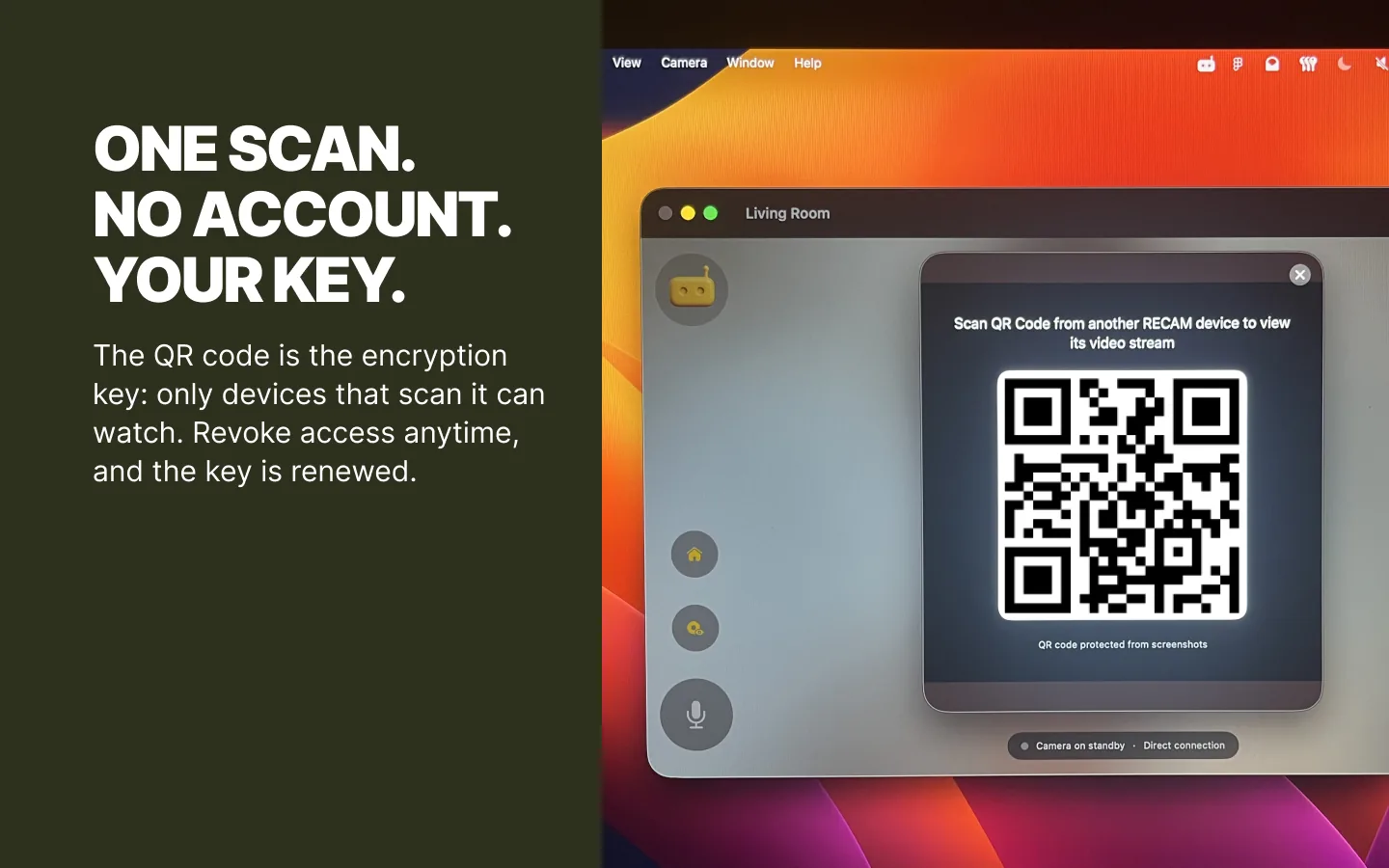
- Pair them with one QR scan. On the Mac, open the camera’s QR code with the Share button, then scan it from the other device. That QR code is the encryption key, so RECAM keeps it out of screenshots and screen sharing.
- Turn on Open RECAM at login. It’s in RECAM’s settings on the Mac. After a restart, RECAM reopens as the camera once the Mac logs in.
- Pick a profile and the sounds. Choose Baby Phone, Pet Watcher or Home Security, arm the sounds you care about, then walk into the frame to test an alert.
Lid Open, Plugged In, Awake: The Three Rules
- Lid open. Closing a MacBook’s lid puts it to sleep, and a sleeping Mac films nothing. Open the lid, and leave it open.
- Plugged in. RECAM keeps the Mac awake while it streams, and the display can sleep. On battery, a tired MacBook won’t last the afternoon, and RECAM shows you the battery level so you see it coming.
- Awake after a restart. With Open RECAM at login on, the Mac comes back as a camera after a restart, once it logs in. If your Mac asks for a password at startup, someone has to type it before RECAM can start. After a power cut, the camera stays off until then.
Close the RECAM window and it keeps watching. The RECAM icon in the menu bar shows that the camera is on, and stops it.
Built-in Camera, USB Webcam or Your iPhone
The picture is only as good as the camera behind it: RECAM streams up to 1080p at 30 frames per second, if the webcam can. A MacBook’s or an iMac’s built-in camera is the simplest choice. A USB webcam puts the lens where the Mac can’t go, on top of a bookcase or angled at the door, with the Mac on the desk below. And on macOS 14 or later, Continuity Camera makes an iPhone the Mac’s lens.
One honest aside: if that iPhone is a spare, it can be the RECAM camera on its own, no Mac needed. Here’s that setup. Continuity Camera fits when you’d rather keep the Mac in charge, for example on a Mac mini with no camera of its own.
What It Watches and Listens For
Everything runs on the Mac itself, and nothing is sent off to be analysed. It detects people and animals, and listens for more than forty sounds you arm one by one: glass breaking, a smoke alarm, a baby crying, a dog barking.
Three profiles retune it: Baby Phone, Pet Watcher and Home Security. On a Baby Phone camera, baby face monitoring tells you when your baby’s face is no longer visible to the camera, for example when it looks covered; the baby monitor guide has the details. Pet Watcher listens for barks, whimpers and meows, as in the pet camera guide.
It also reports on itself, so you’re not guessing: the battery on a MacBook, heat, Low Power Mode, standby, and a volume too low for the siren.
With RECAM Pro, you can do more than watch:
- Clip replay (Pro). Clips record to the Mac’s own disk and nowhere else, and are deleted automatically after 1, 7 or 30 days, or never.
- Push to talk (Pro). Up to thirty seconds of your voice, played out loud by the Mac. Delivered, not a call.
- The remote siren (Pro). Up to five minutes, after you confirm. On a Baby Phone camera, a lullaby or white noise takes its place.
What It Costs
Your first three days include live video and alerts. After that, both are part of RECAM Pro, a monthly or yearly subscription that also adds clip replay, the siren or a lullaby, and push to talk. One subscription covers your iPhone, iPad and Mac on the same Apple Account. Pro comes from the camera owner’s account, so the people they share a camera with need no subscription of their own.
What It Can’t Do
- It watches the room it sits in. Not the house, not the street. Put it where the thing you care about happens: the hall facing the front door, the cot, the dog’s corner, the home office or the garage.
- It can’t be your daily laptop too. The MacBook you take to work leaves with you. Camera duty is for a Mac that stays.
- One role at a time. A Mac watches or is watched. Switch Role… changes it.
- The picture depends on the camera. A dark room gives a dark picture, and RECAM doesn’t add night vision. Leave a lamp on if it matters.
- A swollen battery means retirement. If a MacBook’s case bulges or its trackpad lifts, don’t put it on camera duty: have the battery replaced, or recycle the Mac.
Give the Old Mac a Job
Watching from another Mac? Keep this camera in a Mini Window in the corner of your screen while you work.
The Mac in the cupboard can watch the room now.
No account, no hub to buy, one QR scan.
FAQ
Can I use an old MacBook as a security camera with the lid closed?
No. Closing the lid puts the Mac to sleep, and a sleeping Mac films nothing. Keep the lid open and the MacBook plugged in. RECAM keeps the Mac awake while it streams, and the display can sleep.
Which Macs work with RECAM?
Any Mac on macOS 13 Ventura or later, Apple silicon or Intel. Open the Apple menu → About This Mac to check. It’s the macOS version that counts, not the Mac’s age.
My Mac mini has no camera. Can it still be one?
Yes, with a USB webcam, or with an iPhone through Continuity Camera on macOS 14 or later. The same goes for a Mac Studio or a Mac Pro.
Will the Mac go to sleep and stop watching?
Not while RECAM streams: it keeps the Mac awake, and only the display sleeps. Closing a MacBook’s lid is different: it puts the Mac to sleep, and a sleeping Mac films nothing.
What happens after a power cut or a restart?
Turn on Open RECAM at login in RECAM’s settings. The Mac comes back as a camera once it restarts and logs in. If it asks for a password at startup, the camera stays off until someone logs in.
Can I use my iPhone as the Mac’s camera?
Yes, through Continuity Camera on macOS 14 or later. If the iPhone is a spare, it can also be the RECAM camera on its own, without the Mac.
Where are the clips stored?
Clip replay is a RECAM Pro feature. Clips stay on the Mac’s own disk and nowhere else, deleted automatically after 1, 7 or 30 days or never, within 100 clips and roughly 2 GB.