
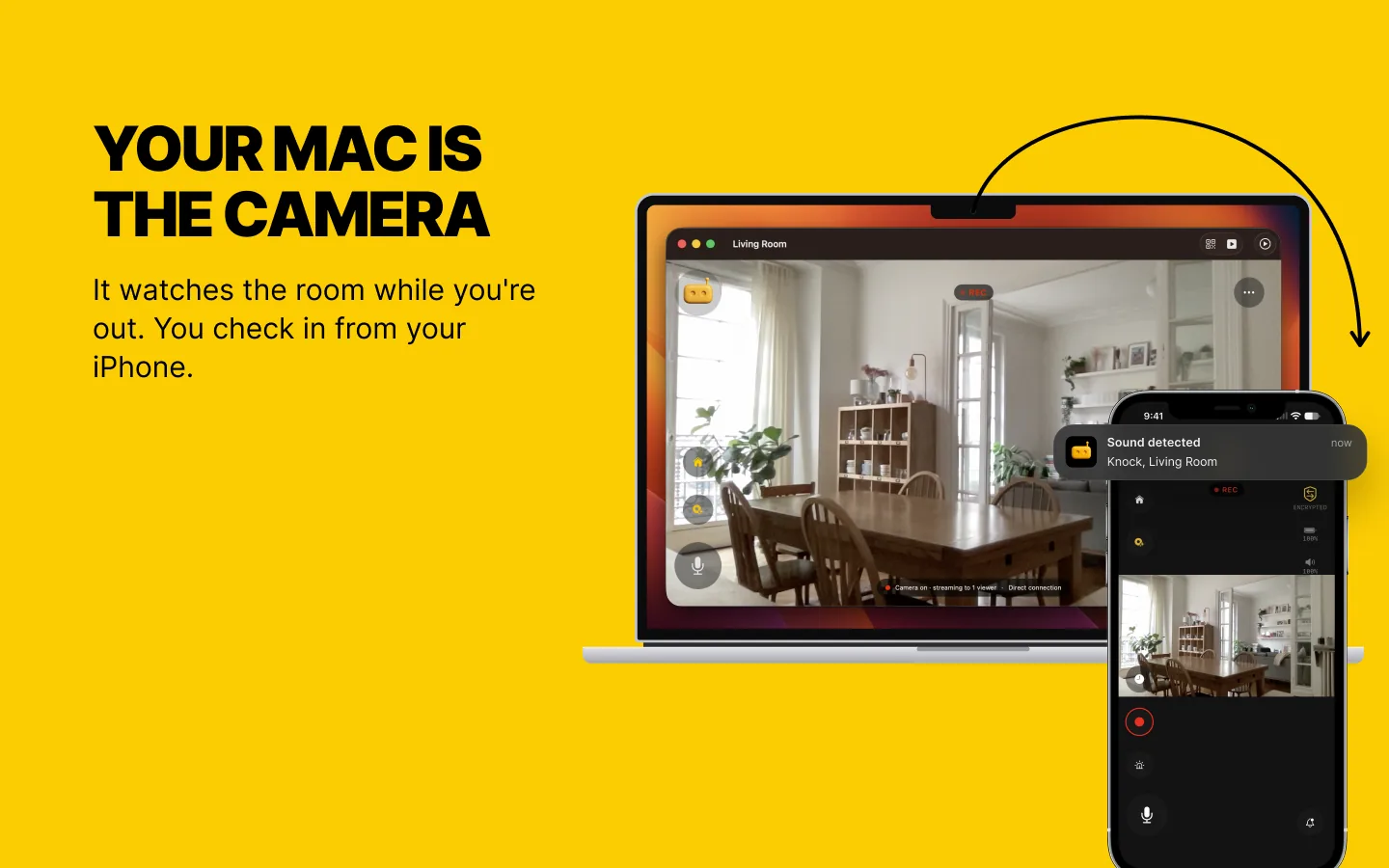
What’s New: Two Jobs for a Mac
Until now, RECAM lived on phones and tablets. Now the Mac joins in, and it can take either role. As the viewer, it puts every camera you own on the big screen at your desk. As the camera, it films the room it sits in and sends the alerts to your phone.
One role at a time: a Mac watches or is watched, and Switch Role… in the File menu changes it. It’s the same RECAM as on your iPhone and iPad, so pairing works the way you already know.
Watch from Your Desk
If you already run RECAM on a spare phone and sit at a Mac all day, this is the part you’ll use first. Your cameras sit in a sidebar. Pick one and the live video fills the window, or the whole screen with ⌘F.
The keyboard does the rest: ⌘1 to ⌘9 jump to a camera, ⌘R records a clip, ⌘T sends a voice message and ⇧⌘S sounds the siren. Clip replay, push to talk and the remote siren are Pro.
Alerts land in Notification Center. Close the window and RECAM waits in the menu bar, so they keep coming. You can lock the app with Touch ID or your password, so whoever borrows your Mac doesn’t get your living room with it. To add a camera, scan its QR code with the Mac’s own camera, built in or USB.
Mini Window: Your Camera in the Corner While You Work
Press ⌥⌘P, or click Mini Window in the toolbar, and the camera you’re watching shrinks into a small video in the bottom-right corner of your screen. No buttons, no sidebar: only the picture. The camera’s sound keeps playing, and a mute button appears when you hover.
It stays on top of your other apps, follows you to every desktop, and shows over apps in full screen. Drag it by the video to wherever it bothers you least, and double-click it to get the full window back. It works like picture-in-picture, and it shows one camera at a time: the one you had open. Here’s how to keep the baby, the dog or the front door in the corner of your screen.
Or Make the Mac the Camera
The MacBook you retired because its battery gave up, the iMac nobody uses: either can be the camera. Any Mac on macOS 13 Ventura or later works, Apple silicon or Intel. It films with its built-in camera, a USB webcam, or your iPhone through Continuity Camera on macOS 14 or later, up to 1080p at 30 frames per second if the webcam can. You watch it from your iPhone, your iPad, another Mac or an Android phone.
Close the window and it keeps watching: the RECAM icon in the menu bar shows it, and stops it. RECAM keeps the Mac awake while it streams, and the display can sleep. A laptop’s lid has to stay open: closing it puts the Mac to sleep, and a sleeping Mac films nothing. That’s why this is a job for the Mac that stays home, not the one in your bag.
Turn on Open RECAM at login and a Mac kept for the job comes back as a camera when it restarts and logs in. It also tells you about itself: the battery on a MacBook, heat, Low Power Mode, standby, a volume too low for the siren.
It watches the room it sits in, so point it at the door or the corner that matters. The full setup, with the honest limits, is in Turn an Old MacBook or iMac Into a Security Camera.
Same Pairing, Same Privacy
Pairing is one QR scan, and that QR code is the encryption key itself, which is why RECAM keeps it out of screenshots and screen sharing. Video goes directly from device to device when your network allows it, otherwise through a relay that never holds the key. It’s end-to-end encrypted either way.
Detection runs on the camera device, a Mac included: human and animal detection, more than forty sounds you arm one by one (glass breaking, a smoke alarm, a baby crying, a dog barking), and baby face monitoring, which tells you when your baby’s face is no longer visible to the camera, for example when it looks covered. The Baby Phone, Pet Watcher and Home Security profiles retune what it watches and listens for. On a Mac camera, clips (Pro) record to the Mac’s own disk and nowhere else.
There’s no account to create and no hub to buy.
What It Costs
Your first three days include live video and alerts. After that, both are part of RECAM Pro, a monthly or yearly subscription that also adds clip replay, the siren or a lullaby, and push to talk. One subscription covers your iPhone, iPad and Mac on the same Apple Account. Pro comes from the camera owner’s account, so the people they share a camera with need no subscription of their own.
Mix It with What You Have
A Mac pairs with whatever you already own: an iPhone, an iPad, another Mac or an Android phone, in either direction. The Mac on your desk can watch an old Android phone in the nursery, and an iMac in the hall can send its alerts to the Android phone in your pocket. Or keep it all Apple: a spare iPhone as the camera, the Mac as the screen.
Sharing works the same as on phones. Pair someone else with the camera’s QR code and they watch from their own iPhone, iPad, Mac or Android phone.
Get It
RECAM needs macOS 13 Ventura or later on the Mac. The technical prerequisites list what every device needs, Mac included.
The Mac on your desk, or the one nobody uses, has a job now.
No account, no hub to buy, one QR scan.
FAQ
Is this the same app as on my iPhone?
Yes. It’s the same RECAM as on your iPhone and iPad, from the Mac App Store, and it pairs the same way, with one QR scan. A Mac pairs with iPhones, iPads, other Macs and Android phones. For the subscription, see What it costs above.
Which Macs can run RECAM?
Any Mac on macOS 13 Ventura or later, Apple silicon or Intel. To check, open the Apple menu → About This Mac. Using an iPhone as the Mac’s camera through Continuity Camera needs macOS 14 or later.
Can my MacBook be the camera if I close the lid?
No. Closing the lid puts the Mac to sleep, and a sleeping Mac films nothing. Keep the lid open and the MacBook plugged in. RECAM keeps the Mac awake while it streams, and the display can sleep.
Can a Mac watch and be watched at the same time?
No. A Mac does one job at a time: it watches your cameras or it is the camera. Switch Role… in the File menu changes it.
Do I still get alerts when the RECAM window is closed?
Yes. Alerts land in Notification Center, and RECAM keeps running from the menu bar when you close the window. To stop it completely, quit it from the RECAM icon in the menu bar.
Does RECAM for Mac work with my Android phone?
Yes, in either direction. An Android phone can be the camera your Mac watches, and a Mac can be the camera you watch from an Android phone.